Mobile PDF reader and launcher for on-device document workflows
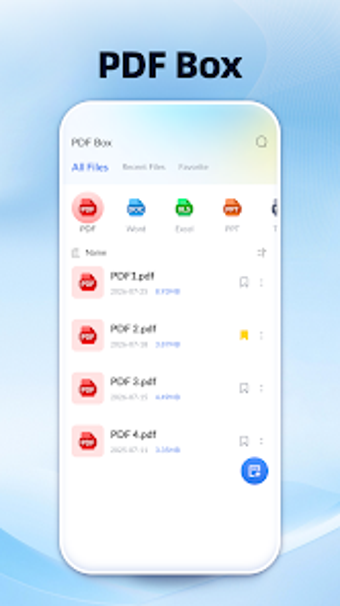
PDF Box: PDF Reader Tool by Wah Hub centralizes PDF and document management on Android devices. It combines viewing, scanning, basic editing, conversion and a lightweight launcher to reduce app switching during mobile tasks. The app supports common office formats, image-to-PDF conversion, and on-device password protection. Designed for students, office professionals, and remote workers who need compact, local document handling and quick mobile workflows.
What is PDF Box used for on a mobile device?
PDF Box acts as a compact document hub that places several document workflows on a single Android device. The app provides a multi-format viewer that handles PDF and common office documents, plus an on-device scanner and converters. It organizes reading, creation, and short-cycle edits so a single mobile user can manage files without switching between specialized utilities.
What can you accomplish in a typical document workflow?
Workflows start with capture and end with a deliverable: use the camera-based scanner to digitize paper, apply basic annotations, then create consolidated outputs. The tool includes file utilities such as merging multiple PDFs and splitting single files, and conversion from images or plain text into PDF format, enabling clean, single-file reports or scanned packets for distribution.
Is the interface easy to adopt and customise for daily use?
The app pairs a lightweight, custom launcher with on-device document tools, which reduces reliance on multiple apps. Editing functions are basic, limited to annotation, highlighting, and text markup, so non-specialist users can begin without specialist training. The developer issues regular updates to support modern Android versions, which helps keep the interface responsive on standard business hardware.
How does it handle compatibility, sharing, and performance?
Compatibility covers standard office formats and on-device conversion, so documents created or opened on the phone remain usable across typical desktop suites. The tool provides password-based protection for sensitive files and operates offline for conversions and editing. Reception notes smooth performance on Android devices, but the feature set does not list cloud syncing or shared editing, which limits collaborative workflows for distributed teams.
PDF Box suits solo mobile workers who need local document control
PDF Box is a practical choice for students and single-device professionals who prefer handling scanning, conversion, and document consolidation on the phone. It favors on-device control and minimal app juggling; however, teams that require cloud collaboration or advanced PDF editing will find the app's scope limited. For individual mobile workflows, it provides a compact, reliable option focused on local document tasks.